
MathPoint
TeX math in PowerPoint,
straight from ChatGPT and Claude
MathPoint is an add-in for PowerPoint and Word. Ask Claude or ChatGPT in chat, and equations, figures, and tables typeset with TeX appear in the file you have open. Typesetting runs on our server, so you need no TeX installation. You can also skip the AI and type LaTeX straight into the task pane.
Free plan: 30 items a month · PowerPoint and Word on Windows, Mac, and the web
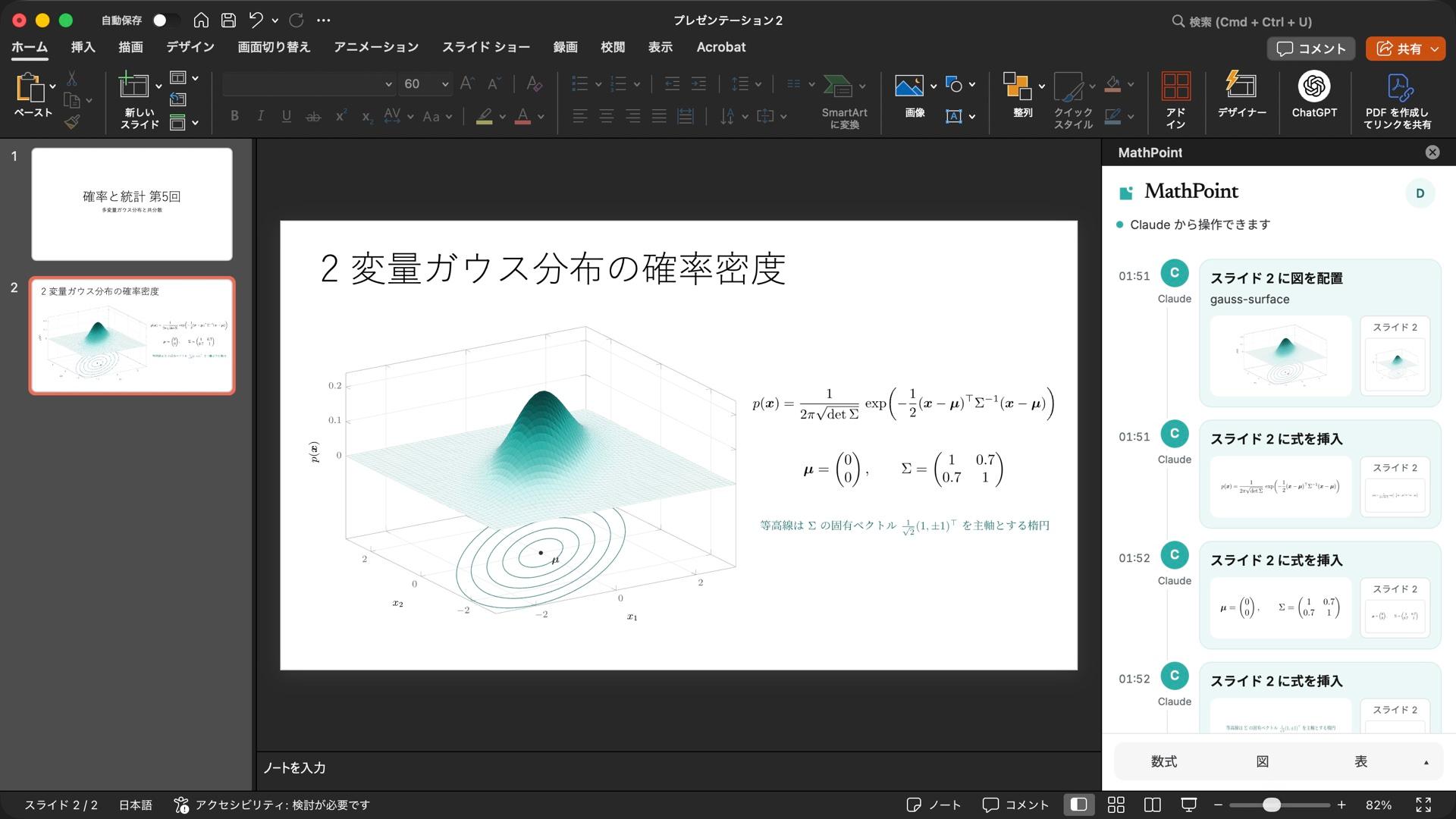
Put a 3D plot of a bivariate Gaussian on slide 2
Three steps to start
- 1
Install with one command
Paste it into Terminal on a Mac or PowerShell on Windows, then reopen PowerPoint.
Maccurl -fsSL https://mcp.tex64.com/mathpoint/install | shWindowsirm https://mcp.tex64.com/mathpoint/install.ps1 | iex - 2
Sign in from the task pane
Open Home → Add-ins → MathPoint and sign in with your Google account.
- 3
Type and insert an equation
In the equation tab, type x^2 + y^2 = 1, check the preview, and click Insert. No AI connection is required.
What to ask for
- Put the quadratic formula on slide 2
- Redraw this hand-drawn circuit as a clean figure
- Turn this table into a booktabs-style table with decimals aligned
- In my Word document, add Euler’s identity after paragraph 3
To ask an AI, connect Claude or ChatGPT from the task pane. Math, figures, and tables are typeset with TeX and can be re-typeset later. Titles and bullet points stay as ordinary PowerPoint text.
Pricing
The free plan includes 30 typeset equations, figures, or tables a month. A paid plan without a monthly limit (600 JPY a month, tax included) is on the way.
Questions
Can I use LaTeX equations in PowerPoint?
Yes. With MathPoint installed, ask Claude or ChatGPT, or type LaTeX in the task pane, and the equation is typeset with TeX and placed on the slide as a vector image. The LaTeX source is stored with the shape, so you can change the color or size and re-typeset it later.
Do I need to install TeX?
No. Typesetting runs on the MathPoint server with LuaLaTeX. You need PowerPoint or Word and a Google account, plus a Claude or ChatGPT account if you want to ask an AI.
Can I use it without an AI?
Yes. Type LaTeX in the task pane, check the live preview, and click Insert to put it on the slide or in the document. TikZ code and tables copied from Excel go in the same way.
How is it different from IguanaTex?
IguanaTex typesets with the TeX installed on your computer, so you need TeX Live, MacTeX, or MiKTeX first. MathPoint typesets on its server, so there is nothing to set up; it also works in Word and can be driven from Claude or ChatGPT. In exchange, it needs an internet connection and a Google account.
Does it work with ChatGPT or Claude?
Both. MathPoint is also a public MCP server, so other MCP clients can connect to it too.
Does it work in Word?
Yes. Display math goes into its own centered paragraph, and inline math sits on the text baseline.
Can it make figures and tables?
It typesets TikZ and pgfplots figures and tabularray tables. It can also redraw a hand-drawn sketch or a screenshot as a clean figure and swap it in.
Is my slide content stored?
Slide and document content only passes through the server when your AI reads it; it is not stored. TeX sources and typeset results are kept for up to 30 days for your work.
Use another MCP client
Add this URL as an MCP server (connector) in your client.
https://mcp.tex64.com/mathpoint/mcpMathPoint is made by Fermion Inc. It can edit only files where the MathPoint task pane is open.
How your data is handled