
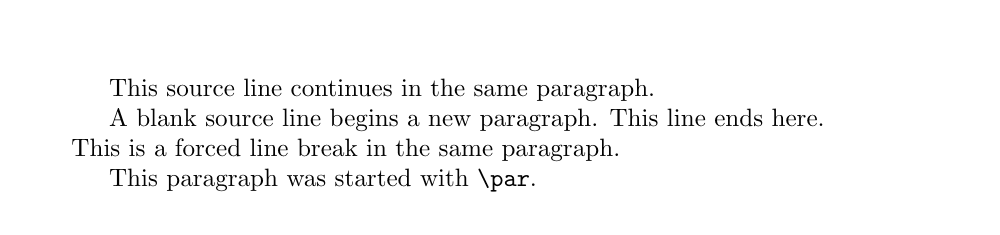
A blank line is the \par command
A line break in the source becomes nothing more than one space in the output. Sentences written across three lines are still set as one continuous run, and TeX decides where the lines actually break. But the moment the input processor meets a line that contains nothing but whitespace, it sends \par instead of a space. Two consequences follow. First: two blank lines, or five, change nothing. By the time the second \par arrives TeX is already in vertical mode, and \par in vertical mode does nothing at all — stacking blank lines to buy space moves the page by exactly zero. Second: a blank line and \par are interchangeable.
These three lines are broken
in the source, but they come out
as a single paragraph.

The blank line above started a new one.
Extra blank lines add nothing.


Still just one paragraph break.
The place where you actually want to write \par is wherever a blank line is not allowed. Blank lines are commonly forbidden inside the definition of your own commands and inside arguments: put one in the argument of \section{...} and the run stops with ! Paragraph ended before \@sect was complete. Math mode forbids them too, and answers with ! Missing $ inserted. In ordinary body text, on the other hand, a row of \par only makes the source harder to read, so blank lines are the sensible default in a manuscript.
Why \\ does not end a paragraph
All \\ says is “end the line here”. It never says anything about ending the paragraph. Under the hood it fills the rest of the line with \hfil and forces a break there; \par appears nowhere in it. The paragraph simply carries on. Measure the output and the difference is plain: in article at 10pt the first line of a new paragraph starts 15pt inside the left margin, while the line after a \\ starts exactly at the margin — no indent. The inter-paragraph glue \parskip is not inserted either. That is the whole explanation for the familiar half-formed look, where the text does break but does not read as a paragraph.
The log offers even plainer evidence. Put a \\ at the end of the last line of a paragraph and TeX warns: Underfull \hbox (badness 10000) in paragraph at lines 3--4. What happens is that \\ orders a break and the paragraph then ends immediately, leaving one line with nothing in it. Raise \showboxdepth and look inside: the box is \hbox(0.0+0.0)x345.0 — zero height, and as wide as the full measure. In the opposite situation, using \\ where no line has begun yet (at the very start of a paragraph, say) gives ! LaTeX Error: There's no line here to end. Both symptoms say the same thing from opposite sides: \\ is a tool for lines, not for paragraphs.
None of which makes \\ useless. With a length in square brackets, \\[2ex] adds extra vertical space after that line — negative values allowed — and it is the standard move for opening up rows in tables and displayed equations. \\* forbids a page break at that break point, keeping the two lines together. In paragraph mode \newline behaves exactly like \\. \linebreak is the odd one out: it breaks at that point and stretches the spaces so the line justifies to the right margin, which is why word spacing can go gappy. \linebreak[n] (n from 0 to 4) sets how insistent the request is — 4 forces it, 1 is a mild “if convenient”. Inside tables it also pays to remember that \\ ends the whole row while \newline breaks only within a cell.
% wrong: the second block is still the same paragraph
First thought about the topic.\\
Second thought about the topic.

% right: a blank line ends the paragraph
First thought about the topic.

Second thought about the topic.

% \\ is for lines that belong together
\begin{tabular}{ll}
  Ada Lovelace & 1815 \\[2pt]
  Alan Turing  & 1912 \\
\end{tabular}
The defaults of \parindent and \parskip
Only two lengths decide how a paragraph looks. \parindent is the width of the first-line indent and \parskip is the vertical space between paragraphs. In the standard classes, single column, \parindent is 15pt at 10pt text, 17pt at 11pt, 1.5em (about 17.6pt) at 12pt, and 1em in two-column mode. \parskip, meanwhile, defaults to 0pt plus 1pt. Not zero, but rubber: zero that may stretch by up to 1pt, and the accumulated slack of those single points is what gives TeX a little room to even out the bottom of a page. Standard LaTeX, in other words, follows the book-typography convention of marking paragraph boundaries with an indent alone and leaving the space at effectively nothing.
To flip the indent for a single paragraph, use \noindent and \indent. \noindent at the head of a paragraph removes its indent; \indent forces one (internally it just places an empty box of width \parindent). Neither works mid-paragraph: whether to indent is settled the instant the first line starts, and the decision cannot be revoked afterwards. The commonest use by far is a \noindent when you resume prose that was interrupted by a quotation or a figure.
Why the first paragraph after a heading is not indented
This is not a bug but a deliberate typographic convention. An indent is fundamentally a separation signal — “a new paragraph starts here” — and it only means something when another paragraph precedes it. Right after a heading there is no preceding paragraph to separate from, so the indent would be an indent about nothing; omitting it is the traditional agreement. Measurement bears it out: only the paragraph following a \section starts flush at the left margin, and the 15pt indent returns from the next paragraph onward.
The implementation is the fun part. LaTeX does not refrain from setting the indent. TeX puts down the usual empty box of width \parindent at the head of the paragraph, and then LaTeX, from inside \everypar, runs {\setbox\z@\lastbox} and takes that freshly placed box straight back off the list. Which headings do this is decided by the sign of the “space before the heading” argument in the sectioning command: the minus in the -3.5ex of \section is read by the kernel as “do not indent the paragraph that follows”. And the indentfirst package, which puts the indent back, is essentially one line — \let\@afterindentfalse\@afterindenttrue. By making “false” an alias for “true”, it renders the switch that suppresses indentation permanently unpressable.
\usepackage{indentfirst}   % indent the first paragraph after a heading too
\setlength{\parindent}{2em} % a wider first-line indent

\section{A heading}
With indentfirst loaded, this paragraph is indented like the others.
Block paragraphs: why to reach for the parskip package
Specifications, internal documents and anything with web ancestry often prefer “block paragraphs”: no first-line indent, paragraphs separated by vertical space instead. The naive recipe is to zero \parindent and give \parskip some space in the preamble. That, however, drags far more along with it than you expect. Lines of the table of contents, the gaps between list items, the space around figures — LaTeX reuses \parskip as a base quantity in many places, so all of them stretch at once, not just the body paragraphs.
The parskip package takes that job over, and \usepackage{parskip} is the whole of it. The version shipped with TeX Live 2024 (v2) sets \parindent to 0pt and \parskip to .5\baselineskip plus 2pt, and then patches the definitions behind heading spacing, the table of contents and lists so that they subtract the added \parskip and land back on their designed values. Chasing all of that by hand is not realistic. The remaining plus 2pt of stretch is deliberate too: it gives TeX room to find better page breaks. If you want block paragraphs but keep the indent, ask for \usepackage[indent]{parskip}; to name the gap yourself, \usepackage[skip=10pt]{parskip}.
% the naive version: also stretches the TOC, lists and float spacing
\setlength{\parindent}{0pt}
\setlength{\parskip}{\baselineskip}

% the maintained version: same look, without the collateral damage
\usepackage{parskip}
% \usepackage[indent]{parskip}     % keep the first-line indent
% \usepackage[skip=10pt]{parskip}  % choose the gap yourself
Paragraph breaks, page breaks and unbreakable spaces
Changing paragraph and changing page are different operations. \newpage ends the current page and moves to the next, but it does not split a paragraph. \clearpage goes further, flushing every pending float — figures and tables — before it turns the page. Use either one when what you wanted was a new paragraph and you get an unintended page break and a half-empty page foot along with it. There are tools for the opposite need too. The tilde ~ is a space that will not break, used where the two sides must stay on one line: Fig.~3, Dr.~Smith. \, is a thin space, for instance between a number and its unit. Neither breaks a line or a paragraph; they only specify the character of a space, and holding on to that distinction keeps the four commands apart.
Handling paragraphs while you write
Because source line breaks do not change the output, you can spend them entirely on editability. The common working conventions are one sentence per line, or wrapping at clause boundaries. Shorter lines make version-control diffs readable, and a co-author reviewing the file can see at a glance which sentence changed. Keep blank lines for the places where the paragraph genuinely changes. The moment you start using source line breaks as a substitute for breaks on the page, the whole thing collapses as soon as the font or the margins change.
Close to a deadline it is tempting to add blank lines or a \vspace purely by eye. But in LaTeX a paragraph is document structure. Does one paragraph carry two claims? Does the explanation of a figure belong to the paragraph before it or after it? Is a short bridge needed straight after a heading? Those are the judgements to make first. Then keep the rule — blank lines mark paragraph boundaries, \\ is only for a visual break inside one paragraph — and the structure survives any number of revision passes.
- Body paragraphs — start a blank line when the claim changes; never add blank lines for appearance alone.
- Title blocks, addresses, verse — use
\\only when one semantic item should occupy several output lines. - Unhappy with the gap between paragraphs — decide it document-wide with the
parskippackage, not with local\vspace. - Unhappy with the indent — set
\parindentonce in the preamble, and loadindentfirstif you want the paragraph after a heading indented as well. - Unhappy with the page breaks — reach for page-break controls or float placement, not paragraph commands.