
What TeX is: a typesetting engine born from a set of galley proofs
TeX is a program that reads a text file with commands in it and works out, to a fraction of a point, where every character and rule goes on the page. Typesetting is originally a printing term — picking metal type letter by letter to build a printing forme — and TeX takes that job over on a computer. Its author is Donald Knuth, a computer scientist at Stanford. His first design memo, written in May 1977, survives under the name TEXDR.AFT and was later reprinted as a chapter of his book Digital Typography. The first working version ran in 1978.
Because Knuth's goal was beautiful mathematics, every detail of TeX is obsessive. It does hyphenation inside words, kerning of pairs like AV and To, ligatures that cast fi and fl as a single glyph, and widow/orphan control that stops a lone first or last line of a paragraph from being stranded on its own page — all without being asked. Line breaking in particular does not fill one line at a time: TeX looks at the whole paragraph and picks the set of breaks with the lowest total cost, which is why adding one character at the end of a paragraph can change where its first line breaks. That thoroughness is why academic publishing still runs on TeX.
One more fact captures TeX's character. Its version numbers are designed to converge to π: each release adds one more digit after the decimal point, and the TeX shipped in TeX Live 2024 calls itself 3.141592653. Knuth has declared that on his death the version will be frozen at π and any change after that is to be regarded as a bug. Its sibling, the font program Metafont, converges the same way to e, the base of natural logarithms. It is a joke about version numbers that has been maintained in earnest for over forty years.
$ tex --version
TeX 3.141592653 (TeX Live 2024)
kpathsea version 6.4.0
How “TeX” and “LaTeX” are pronounced
The final X is not the Latin letter but the Greek χ (chi). TeX is the first three letters of the Greek τέχνη (technē, craft or art), and Knuth writes that it should be said with the ch of German ach or Scottish loch. So English speakers land near “tech”, and in Japan the name has long also been read “tef”. LaTeX is variously said “LAY-tech”, “LAH-tech” or “LAY-teks”, and no ruling has ever settled it. It has nothing to do with the material latex. The logo with its raised and lowered letters comes from the same source; writing \LaTeX in your text produces it.
What LaTeX is: a macro package, not a separate program
LaTeX is not a different program from TeX. TeX has a macro facility — a way to define new commands out of existing ones — and LaTeX is a very large body of commands written using nothing but that facility. When you run pdflatex, you are not launching “the LaTeX executable”; you are launching a TeX engine that has been preloaded with the whole LaTeX command set. Getting this wrong is what makes the words “engine” and “format” confusing later on. On a TeX Live installation you can even check that latex and pdflatex point at the same executable, but that demonstration belongs to the pages on classic TeX and on LaTeX as a format.
The person who wrote those macros is Leslie Lamport, the computer scientist later known for his work on distributed systems. In the early 1980s, while at SRI International, he accumulated a set of TeX macros for his own documents and then released them; that release was LaTeX. He drew a line under his own work with LaTeX 2.09 in 1985 and published the manual LaTeX: A Document Preparation System with Addison-Wesley the following year, in 1986. The “La” in the name is the La of Lamport.
What anyone means by “LaTeX” today is almost certainly LaTeX2e, released on 1 June 1994 by the LaTeX Project team around Frank Mittelbach. The reason is stated plainly in the primary source, LaTeX News issue 1: derivatives of LaTeX 2.09 had multiplied to the point where a site had to keep LaTeX with and without NFSS, plus SLiTeX and AmSLaTeX, side by side — so they were brought back under a single format. That is when the first line of a document changed from \documentstyle to \documentclass. The command everyone types first is, in fact, a product of that 1994 unification. The long-running LaTeX3 effort never became a separate product: since 2018 it has shipped inside the LaTeX2e kernel as the expl3 programming layer, and most modern packages are written on top of it.
Writing meaning instead of appearance: the real break with word processors
In a LaTeX document you do not write “14pt bold, 3.5 lines of space above” to make a heading. You write \section{Introduction} — only the fact that this is a section heading. The point sizes and the spacing live in the class file. Open article.cls in TeX Live 2024 and line 302 reads \@startsection{section}{1}{\z@}{-3.5ex ...}{2.3ex ...}{\normalfont\Large\bfseries}: put 3.5ex of space above, 2.3ex below, and set it \Large and bold. Those numbers never appear in your manuscript. That is why swapping article for a journal's own class makes every heading obey the journal, without your touching a word of the text. It is exactly the split between HTML and CSS on the web.
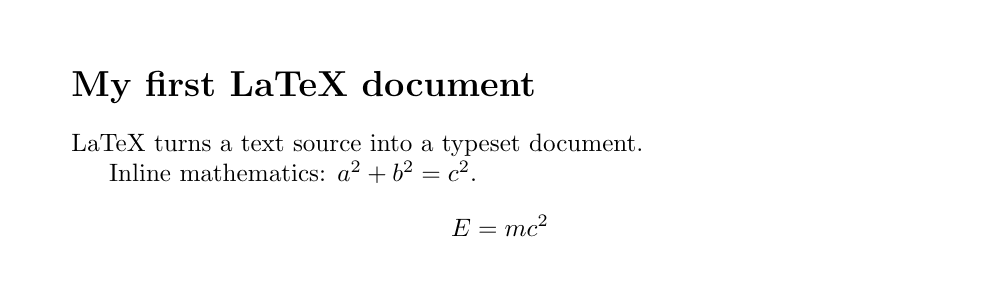
\documentclass{article}
\begin{document}
\section{Introduction}
The body says what the text \emph{is}, never how it should look.
\[ E = mc^2 \]
\end{document}
The division of labour pays off once a document gets long. You never type a number: put down \label and \ref and the “see Figure 3.2” and its page number fill themselves in, and when an inserted figure shifts every number, they all correct themselves. The table of contents, the index and the bibliography are generated the same way. Put the other way round: the moment you start bolding a heading by hand or typing a number yourself, you have given up the part LaTeX is best at. There is a price, though. You cannot see the result as you type. Write, compile, look at the PDF — that loop is the rhythm of LaTeX, and until it becomes habit it feels distinctly slower than a word processor.
TeX vs LaTeX vs pdfLaTeX vs upLaTeX vs LuaLaTeX
The names multiply because they are a product of two things: the engine (the program that does the work) and the format (the system of commands). Engines are TeX, pdfTeX, XeTeX, LuaTeX and pTeX/upTeX; formats are plain TeX, LaTeX and ConTeXt. pdflatex is “the pdfTeX engine plus the LaTeX format”, uplatex is “the upTeX engine plus the LaTeX format”, and so on — the names are literally the multiplication. LaTeX on the Japanese engines pTeX and upTeX is called pLaTeX and upLaTeX respectively. Which engine to pick is a practical question the page on choosing an engine answers properly, but as a rough guide: pdflatex for mostly-English text, lualatex or xelatex when you want the fonts already on your system, and uplatex or lualatex for Japanese.
| Name | What it actually is | Where it fits |
|---|---|---|
tex | Knuth's engine itself, with the plain TeX format | For understanding the machinery; not for everyday writing |
latex | The LaTeX format, producing DVI output | The classic route through DVI; also the base of the Japanese workflow |
pdflatex | The pdfTeX engine plus LaTeX; writes PDF directly | The default for Latin-script documents; the best-tested choice |
uplatex | The upTeX engine plus LaTeX; writes DVI | The standard for Japanese papers; strong on vertical writing and Japanese line-breaking rules |
xelatex | The XeTeX engine plus LaTeX; Unicode and system fonts | When you want to name an OpenType font and have it just work |
lualatex | The LuaTeX engine plus LaTeX; extensible from inside with Lua | The one to start on today; Japanese via luatexja |
Who LaTeX is for, and who it is not for
In one sentence: LaTeX wins in proportion to how long, structured, and often-revised a document is. Lots of mathematics, deep sectioning, dozens of figures and references, a different house style for every venue, co-authors reading diffs in Git — the more of those apply, the more the automation pays. In physics, mathematics and computer science it is effectively the standard: the preprint server arXiv asks for LaTeX source, and Wikipedia writes its formulas in LaTeX notation.
The flip side is that there are jobs where LaTeX is plainly not worth it. Anything where you want to place elements at arbitrary positions — a one-page flyer, a poster — is faster and more predictable in a layout program. If your co-authors all use Word and nothing else, the conversion overhead eats the automation gain. And if the deadline is tomorrow and you have never used LaTeX, write it in Word today: this takes days to learn, and those days cannot be paid for with borrowed time. “Use LaTeX and your document will be beautiful” is not an accurate claim. The accurate version is: write the structure correctly and you are released from the work of formatting.
- If the document is full of mathematics, reach for LaTeX without much thought. Nothing else sets equations this well.
- If your venue publishes a LaTeX class file, use it. The entire argument about formatting disappears.
- If a document will be grown with co-authors over years, plain text earns its keep. Diffs are readable in Git, and the file still opens in a decade.
- If the goal is a one-page layout, use a different tool and don't feel bad. Placing things at chosen coordinates is what LaTeX is worst at.
- To simply try it, run it in a browser instead of installing anything. Giving up during setup is the saddest way to bounce off LaTeX.
Finally, the practical reasons TeX has survived for over forty years. It is free and open source — read it, modify it, sell what you make with it. The input is plain text in a .tex file, so any editor will do, grep will search it, a script can generate it, and Git can diff it. Thousands of extensions sit on CTAN, the Comprehensive TeX Archive Network, so most of the time somebody has already answered “can it do this?”. And the same input gives the same output: on Windows, macOS or Linux, and from a source file written ten years ago. Wherever reproducibility is a requirement — research, official records — that property is hard to replace. Next, go and make an actual page.