
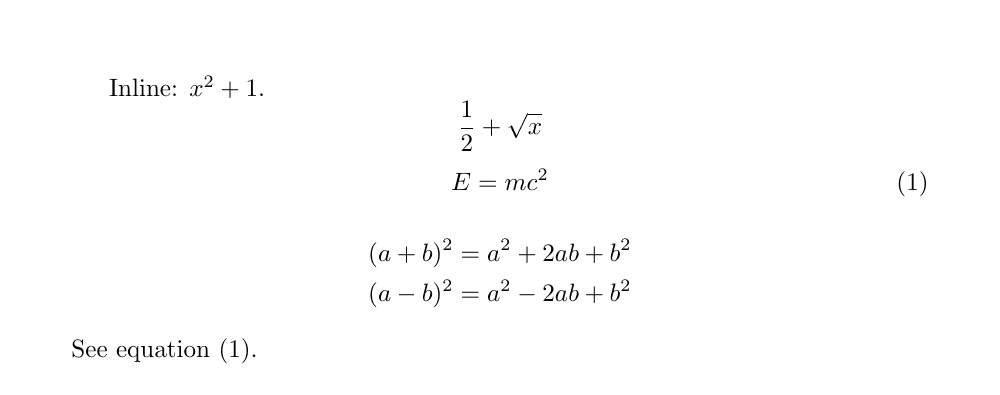
What actually changes when LaTeX enters math mode
Three things change. Typed spaces disappear, every letter becomes a variable name set in math italic, and every symbol is given a class from which the space around it is computed. That is why a+b and a + b produce output identical to the last hair, and why typing log x gives you “logx” — the product of four variables l, o, g and x. Written as the function \log x, the name is set upright and a thin space appears before the x. The same three letters, two entirely different objects as far as TeX is concerned.
% identical output: spaces in the source are ignored
$a+b$ \qquad $a  +  b$

% "logx" (four variables) vs. the function name
$log x$ \qquad $\log x$
Those classes are one of TeX’s central mechanisms. Everything inside a formula is filed as an ordinary atom, a large operator, a binary operator, a relation, an opening, a closing or a punctuation mark, and the space between two neighbours is looked up from the pair of classes. = is a relation, so it carries \thickmuskip — 5mu by default — on each side. In a 10pt document 18mu equals one em, that is 10pt, so the gap works out at 2.78pt a side. You need not memorise the number; what is worth keeping is the idea that spacing follows from meaning. When you want to add space by hand, the commands are \, (a thin space), \;, \quad and \qquad.
These rules exist only inside math mode. That is why writing \to or \alpha straight into running text is an error and not merely ugly: outside math mode the spacing rule simply does not exist. Put A \to B in the body of a document and pdflatex answers ! Missing $ inserted. To get a mathematical symbol you must first get into math mode — which brings us to the doorways.
Inline math: $…$ or \(…\)
The output is identical. What differs is what happens when you make a mistake. $ has category code 3 in TeX — “math shift” — and the same single character both opens and closes: $ is a toggle, not a bracket. \( and \), by contrast, are defined in latex.ltx as two separate macros, each of which checks whether it is currently in math mode before doing anything. That is why the two behave so differently when a delimiter goes missing.
% one closing $ dropped: this compiles, and prints "We compare xandyinthetext."
We compare $x and $y$ in the text.

% the same mistake with \( \): pdflatex stops on this very line
We compare \( x and \( y \) in the text.
The first line above is frightening precisely because it compiles. TeX reads everything from the first $ to the second as a formula, throws away the spaces in “x and ”, sets it in italics, and the leftover $ finally trips at the end of the paragraph with ! Missing $ inserted. — the reported line number points at \end{document}, and the page reads “We compare xandyinthetext.” The second line makes the same mistake, but the second \( notices that math mode is already open and reports ! LaTeX Error: Bad math environment delimiter. on that line. Not having to hunt through a long paragraph is a bigger practical difference than it sounds.
In practice: make \(…\) your default in new documents, especially heavily mathematical ones. The short $…$ is understood everywhere and is perfectly workable if your editor colours the pairs, and it is no reason to rewrite an existing manuscript. The environment form \begin{math}…\end{math} does the same job but is far too long to sit inside a line, and is almost never used. To print a literal dollar sign in the text, write \$.
Display math is set with \[…\]
An important or bulky formula is lifted out of the paragraph onto a line of its own. Without a number that is \[ … \]; with one it is the equation environment. \[…\] is exactly the same thing as the environment form displaymath: centred by default, flush left if you pass the fleqn option to the document class. Above and below it LaTeX inserts \abovedisplayskip and \belowdisplayskip — 10pt each in a 10pt document — and that vertical air is what makes a display look like a display.
The following identity holds.
\[
  \int_0^1 x^2 \, dx = \frac{1}{3}
\]
It is one of the first integrals anyone computes.
One fact makes the rest click into place. Load amsmath and \[ and \] are replaced by the equation* environment itself — the last two lines of amsmath.sty are \DeclareRobustCommand{\[}{\begin{equation*}} and \DeclareRobustCommand{\]}{\end{equation*}}. So under amsmath the question “should I use \[…\] or equation*?” has no content: they are the same thing. Choose between equation and \[…\] on the single question of whether you want a number.
| Form | Numbered | Notes |
|---|---|---|
\[ … \] | no | the LaTeX form; under amsmath it is equation* |
displaymath | no | environment form, identical to \[ \]; verbose, rarely used |
equation | yes | auto-numbered; add \label and cite it with \ref or \eqref |
equation* | no | needs amsmath; what \[ \] becomes once amsmath is loaded |
$$ … $$ | no | the plain-TeX form; do not use it (next section) |
Why $$…$$ is the one form to avoid
$$…$$ is plain TeX’s way of opening a display, and LaTeX has never documented it for authors. It is not forbidden — LaTeX uses it internally. latex.ltx contains \def\equation{$$\refstepcounter{equation}}, so equation and eqnarray are both built on $$ underneath. The trouble is that when you type $$, you go straight past LaTeX’s macro layer, and that layer is where the class options and amsmath’s machinery live.
- The
fleqnoption stops working.fleqn.cloredefines exactly four things —\[,\],equationandeqnarray— and never touches$$. Measured in anarticlewith[fleqn],\[a=b\]starts 25pt from the left margin while$$a=b$$stays centred: 135pt apart on the page. - The vertical spacing changes. When
\[begins a paragraph it quietly inserts an invisible box 0.6 of the line width before running$$. The trick exists to convince TeX that the preceding line was long; without it TeX picks the short variant of the skip (\belowdisplayshortskip, 6pt). Measured, the$$version came out exactly 4pt tighter underneath. \qedherelands in the wrong place. Put\qedhereon the last formula of an amsthmproofand, inside\[…\], the end-of-proof mark rides the right margin. Inside$$…$$it clings to the formula instead, knocking the whole display off centre.- Everything amsmath adds falls away. Since
\[under amsmath isequation*, typing$$throws away the foundation that\tag,\qedhereand the automatic dodging of equation numbers are built on.
The AMS Short Math Guide for LaTeX (version 2.0, 2017/12/22, shipped with TeX Live 2024) takes the same line, discouraging $$ strongly and giving two reasons: it is nowhere documented as part of the LaTeX command set, and it interferes with the correct operation of features such as fleqn. The summary is short. Unnumbered display: \[…\]. Numbered display: equation. If you inherit a manuscript full of $$, replace them mechanically now, and the day you add fleqn or a proof environment will pass quietly.
Words inside a formula: why you need \text{}
Because letters are variables in math mode, if is the product of i and f and area is the product of four variables. To place a word as a word — upright, with correct spacing — use \text{…} from amsmath. Its contents are set in the body font with body spacing, and spaces you type inside it survive, so \text{ for all } keeps its air on both sides. Conversely, $…$ inside \text{…} switches that fragment back into math.
\[
  f(x) = x^2 \quad \text{for all } x \in \mathbb{R},
  \qquad v_{\text{max}} = 3.
\]
The advantage of \text is that it follows the size of its surroundings. Its definition in amstext.sty uses \mathchoice to hand a different font size to each of the four contexts: display, text, script and scriptscript. Measure the “max” of v_{\text{max}} above and it is 6.19pt tall — script size — whereas the same thing written \mbox{max} comes out 8.85pt, sitting in the subscript at full body size and floating above its neighbours. \mbox is the general-purpose “put this in a box” command; it was never a mathematical tool. Note that \text falls back to \mbox when called in text mode, so it is safe inside a macro that may be used in either. Forget to load amsmath and you get ! Undefined control sequence.
Text style and display style: why the same formula looks different
Math mode has four styles, and TeX picks one from context: text style within a line, kept small enough not to wreck the line height; display style on a line of its own, with room to breathe; script style for a subscript; and scriptscript style for a subscript of a subscript. That is why the same \sum_{i=1}^{n} puts its range small at the right of the sign when inline, and large above and below it in a display.
- Sum and integral limits: in display style the range on
\sumsits above and below the symbol; in text style it sits at its right. Integral limits on\intstay at the side by default; use\limitsto place them above and below. - Fractions:
\fracis large in display style and small and tight in text style. To fix the size regardless of context, use amsmath’s\dfracand\tfrac. - Scripts: each level of nesting steps down in size, and nothing shrinks past scriptscript style.
You can also switch by hand with \displaystyle, \textstyle, \scriptstyle and \scriptscriptstyle. The common case is $\displaystyle\sum_{i=1}^{n} i$ when you want a sum’s limits above and below inside a sentence. Be careful, though: scattering \displaystyle through running text makes the line heights uneven and the paragraph ripple. The rule of thumb is to use it only where one particular formula needs it.
% limits sit at the right of the sign
Inline: $\sum_{i=1}^{n} i$

% limits forced above and below
Forced: $\displaystyle\sum_{i=1}^{n} i$
Function names are commands: \sin, \log, \lim
It follows from the rules above that typing sin x writes the product of s, i, n and x. The right way is a dedicated command such as \sin. LaTeX predefines the common function and operator names; each is set upright and each automatically carries a thin space after it. Making the letters upright with \mathrm{sin} does not buy you that space — measured, \log x leaves 1.8pt between “log” and “x”, while \mathrm{log} x comes out as “logx”, glued together.
- Trigonometric and hyperbolic:
\sin\cos\tan\cot\sec\csc;\sinh\cosh\tanh\coth; inverses\arcsin\arccos\arctan. - Logarithms and the exponential:
\log\ln\lg\exp. - Limits and bounds:
\lim\limsup\liminf\sup\inf\max\min\varinjlim\varprojlim. - Algebra and the rest:
\arg\det\dim\gcd\ker\hom\deg\Pr; modulo\bmodand\pmod.
\[
  \lim_{n \to \infty} \left(1 + \frac{1}{n}\right)^{n} = e,
  \qquad \sin^2\theta + \cos^2\theta = 1.
\]
Some of that list — \lim, \max, \min, \sup, \inf, \det, \gcd, \Pr among others — place a subscript directly underneath in display style. That is why \lim_{n\to\infty} sets its condition under “lim” in a display and at the lower right when inline. For an operator that is not on the list, such as rank or Hom, you define your own with amsmath’s \operatorname{…} and \DeclareMathOperator — a story for the amsmath page.